



General Information
What is Golden Crop B2B?
Golden Crop B2B is an online ordering service for business customers. We offer a wide range of Asian food products and ingredients to restaurants, retailers and other businesses throughout Finland.
Our goal is to make ordering simple and efficient through a convenient online platform, reliable deliveries and flexible payment options for approved customers.
Who operates Golden Crop B2B?
Golden Crop B2B is operated by Oy Golden Crop Ab, a food import and wholesale company based in Vantaa, Finland.
Founded in Helsinki in 2012, Golden Crop has grown into one of Finland’s established suppliers of Asian food products, serving restaurants, retailers and other business customers across the country.
For more information about our company, please visit our corporate website.
Who can become a Golden Crop B2B customer?
Golden Crop B2B is intended for registered businesses, such as restaurants, retailers, catering companies and other professional customers.
A company must first be registered and approved in our customer system before orders can be placed.
How do I register as a Golden Crop B2B customer?
To register, please contact our Sales Team at sales@goldencrop.fi and provide the following information:
Company name
Business ID
Company address
Delivery address
Contact person
Telephone number
Email address
Once your company has been registered and approved, we will create your B2B ordering account.
You will then receive an email with a link to set your password. After setting your password, you can log in and start placing orders through our online store.
How can I contact Golden Crop?
For sales, customer registration and order-related enquiries, please contact our Sales Team at sales@goldencrop.fi.
You can also send us a message through our Contact Us page.
Ordering
How can I place an order?
Registered customers can place orders through the Golden Crop B2B online store.
Orders can also be sent through the sales channels agreed with your salesperson.
Do I need an account to place an online order?
Yes. You need an approved Golden Crop B2B customer account before you can place orders through our online store.
I forgot my password. What should I do?
Select Forgot Password on the login page and follow the instructions sent to your registered email address.
If you continue to have problems accessing your account, please contact our Sales Team.
What payment terms do you offer?
Payment terms are determined based on the company's credit information.
Newly established companies or companies that do not meet our credit requirements may be required to pay in advance or at the time of purchase.
Customers with an approved credit rating may be granted 14-day payment terms.
Can my payment terms change?
Yes. Payment terms and credit limits may be reviewed based on the customer's payment history and current credit information.
What happens if I have overdue invoices?
Customer accounts may be temporarily blocked if there are overdue invoices.
Please arrange payment of the overdue invoices or contact us if you have any questions regarding your account.
How the ordering workflow work?
When you have an account and password, you can start to make order from our B2B service.
With your ordering account, you can make quotation on our ordering product page of B2B service by adding products to your Shopping Cart and Wishlist.
After you make a quotation, our sales team will contact you to confirm your quotation to an official sales order, and also confirm the delivery method and delivery date.
A payment invoice will be send to you after your order been confirmed. The payment due date is depending on the payment terms which we aggreged when making your ordering account.
How to make an order?
At the left side of the product page, you can see the Category List and Attributes Filters. You can easily find the products by choosing certain category and and applying filters.
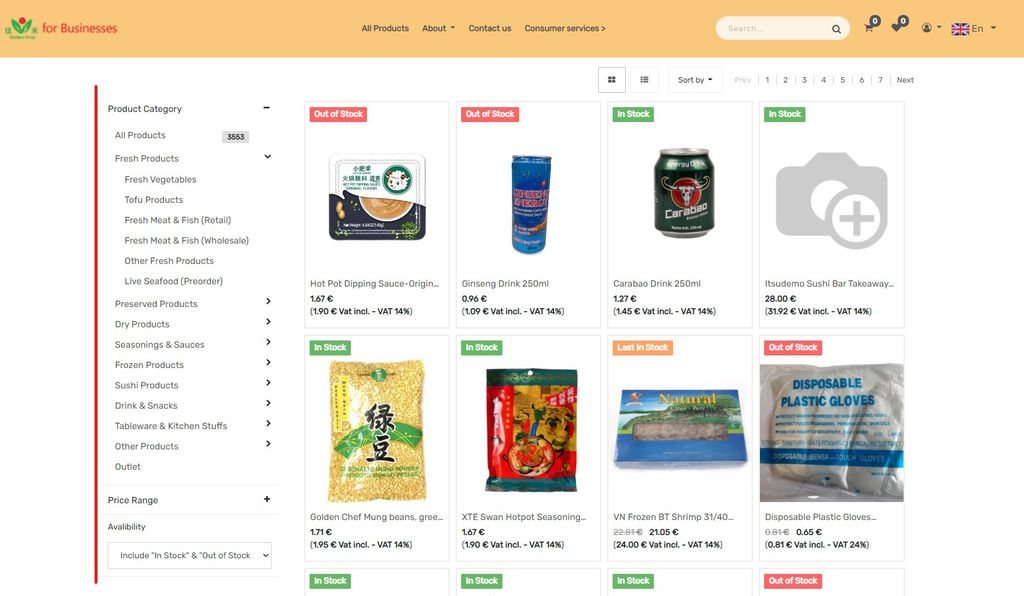
Big screen

Small screen
There are four ways to put product to your Shopping Cart.
1, by click "add to cart" button, it will be a popup window showing which you can choose quantity and add the product to the shopping cart;

2, by click "view more details" button, it will be a popup window showing which you can choose quantity and the product to the shopping cart, but contains more information of the product;

3, by click "add to Wishlist" button, it will add this product to your Wishlist, then you can add this product later from your Wishlist page;

4, by click anywhere else of the product image, you will be linked to the product information page, then you can add check all the information of the product and add it to your shopping cart.

At the top-right (bottom on small screen / mobile devices) of the page, you can find your Shopping Cart, Favorite List, and your Account Information.

Big screen

Small screen
When you move your mouse pointer to the Shopping Cart icon, it shows the details of your Shopping Cart, you can adjust the quantity of the product, and quick access to the Checkout.

On the Checkout page, you can edit your Billing & Shipping addresses, choose a delivery method and prefer delivery date, also leave a note or require. Then you can click "Confirm Order" button.

After you confirmed your order, you will be direct to an order statement page. It will present you the order number and the order processing stage at this page. You can always check your order from "My orders" page where you can find it under "Account Information" icon located at the top-right function section.

Once our sales team see the order from their operating page, they will contact you to go through the order together, and confirm the delivery date.
Can I cancel my order?
Your order can be cancelled if it hasn't been sent out from our warehouse yet. You can contact our sales team and we will cancel your order as we can.
Deliveries
Where does Golden Crop deliver?
Golden Crop delivers to business customers throughout its delivery network in Finland.
Delivery schedules and availability may vary depending on your location. Please contact your salesperson for information about the delivery schedule in your area.
Is delivery free?
Orders over €500 qualify for free delivery within the Uusimaa area.
For orders below the free-delivery limit or deliveries outside Uusimaa, please contact our Sales Team for applicable delivery charges.
When will my order be delivered?
Delivery times depend on your delivery location, order date and your area's delivery schedule.
Your salesperson can provide information about your regular delivery days.
Can I request a specific delivery time?
We cannot always guarantee an exact delivery time.
If your business has specific receiving hours or delivery restrictions, please inform our Sales Team when placing your order.
What should I do if products are missing or damaged?
Please check your delivery as soon as possible after receiving it.
If you notice missing, damaged or incorrect products, contact us promptly and provide your order or invoice number together with photos when applicable.
How much does shipping cost?
The shipping cost is shown in your cart before you confirm an order. This is NOT the final cost — our sales team will contact you about the final delivery fees. Normally the delivery cost is depending on the size, weight, order total amount and delivery method, also the location you're sending to.
Can I choose a shipping method?
Yes, but the final delivery method will based on the agreement you made with our sales team.
What countries do you ship to?
With the pallet consignment we could delivery to the whole Europe.
What shipping methods do you use?
We have our own logistic team which covers about 300km from capital area, and consignment contractors to cover other areas of Finland.
When will you ship my order?
We usually process items at our warehouse within 1-3 business days -- based on the area and order confirmed time.
Other Questions
How do I update my company or contact information?
Please contact our Sales Team if there are any changes to your:
- Company name
- Business ID
- Billing address
- Delivery address
- Contact person
- Telephone number
- Email address
Keeping your information up to date helps us ensure smooth ordering, invoicing and deliveries.
How do I make a product complaint?
Please contact us as soon as possible and provide:
Product name
Product code, if available
Batch or lot number
Quantity affected
Description of the issue
Photos of the product and packaging, when applicable
Providing this information will help us process your complaint as quickly as possible.
Who should I contact about an invoice or payment?
For questions regarding invoices, payments or overdue balances, please contact the appropriate Golden Crop contact indicated on your invoice or contact our team for assistance.
Some tips to make the order easier and save some time.
You can add your most frequency ordered products to the Wishlist at first, and active "Add product to my cart but keep it in my wishlist" function. Then you can easily put these products to your cart without searching them.
Also, with the attribute filters you can narrow down the products faster.
I can't choose delivery methods but "Pick up from Vantaa Market".
Please make sure you have fulfilled "Zip Code / Post Code" section on your address details. The post code is very import in Finland to identify the correct address.
I want to see my history orders / invoices.
Please go to the top-right (bottom area on small / mobile screen) function area to find the "Account information" icon, within the submenu you can find your account information and also you history informations.
Something is missing or broken.
We're very sorry for the inconvenience caused. Please send us photos of the item and/or parcel (or a link to them) so that we can see the problem and conduct an investigation.
I want to return/replace an item or get a refund.
Please contact our sales team or accounting department to get help.
I cannot find the answer to my question. What should I do?
Please visit our Contact Us page or contact our Sales Team at sales@goldencrop.fi.
We will be happy to assist you.